Marketplace production system

Build, repair, preview, and package Azure marketplace applications from one visual system.

ENSEMBLE is for teams that are tired of turning Azure application publishing into a brittle handoff chain. Import what you have, edit what matters, validate what can break, and preview the customer flow before you publish.

End-to-end flow

Import. Design. Preview. Publish.

The product exists to reduce the marketplace handoff tax, not to add another generic editor to the pile.

Maestro Studio ENSEMBLE workflow infographic
Who it is for

ENSEMBLE helps teams wherever the marketplace workflow becomes a drag.

The personas are different, but the pain is similar: too many fragile steps, too much manual editing, and too little confidence before customer-facing publication.

1

First-time publishers

Start from quicker paths instead of trying to assemble every Azure application asset manually from scratch.

2

Existing managed app teams

Import current packages, repair stale logic, update the experience, and regain control over published offers.

3

SIs, GSIs, and MSPs

Use a repeatable production environment instead of recreating marketplace delivery practices differently on every engagement.
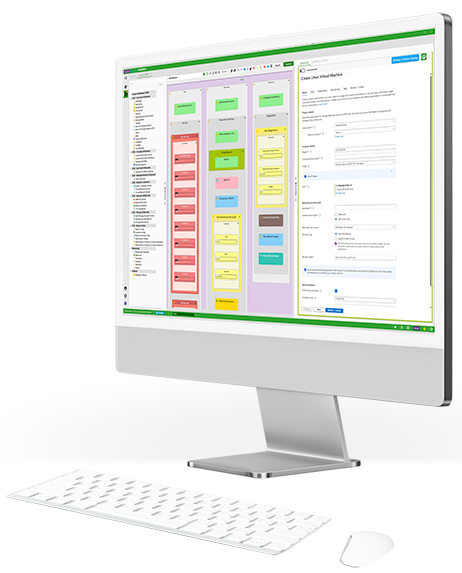
Visual production

A stronger editing surface for the customer-facing experience.

Maestro Studio ENSEMBLE user interface
Core capabilities

What the product is designed to compress.

  • Import and recover. Bring in current packages, templates, or raw technical assets instead of restarting from zero.
  • Preview earlier. Inspect the experience before Partner Center becomes the first real proof point.
  • Reduce logic surprises. Catch more issues before they escape into customer-facing deployment or marketplace review.
  • Handle localization and APIs in-context. Keep important production details inside the same workflow instead of scattering them across tools.
Typical process

Slow handoffs, fragile files, and late confidence.

  • Too many disconnected steps. Editing, validation, preview, localization, and packaging often live in separate places.
  • Marketplace details get buried. High-friction authoring makes routine maintenance slower than it should be.
  • Preview happens too late. Teams discover customer-facing issues after context and momentum have already shifted.
With ENSEMBLE

A tighter production loop with less operational drag.

  • One visual production environment. Import, design, preview, validate, and package without bouncing across disconnected tools.
  • Repair and iterate faster. Existing offers become easier to maintain because the workflow is more inspectable.
  • Publish with more confidence. Customer-facing experience and technical assets are checked sooner, when fixes are cheaper.
Frequently asked

A few practical questions teams ask early.

These are the questions teams usually ask when they evaluate ENSEMBLE.

Can ENSEMBLE import existing Azure application packages?

Yes. That is one of the core reasons it exists. Existing technical assets should be something you can recover, inspect, update, and repackage instead of treating them as a one-way artifact.

Can it help surface logic issues before publication?

That is part of the value proposition. ENSEMBLE is built to reduce the amount of hidden behavior that only becomes obvious after marketplace deployment or customer interaction.

What if localization is part of the workflow?

Localization belongs inside the production loop, not as a bolted-on afterthought. ENSEMBLE keeps that work closer to the rest of the application experience.

Next step

If the marketplace workflow feels heavier than it should, start with ENSEMBLE.

ENSEMBLE helps teams ship Azure marketplace applications with less manual production friction.